General discussion

Description

Off piste conversations

Hi all,


I seem to have picked up a strange bug almost out of the blue whilst creating some plugboard scripts
this is the debug when running xap-plugboard manually

At first i suspected this was an error in a recent lua script but i have sinced removed them from the HAH but continue to have the same error

I have also tried flashing  V310 and Beta V310.1


# xap-plugboard
lua: /usr/share/lua/5.1/pl/config.lua:121: attempt to index local 'key' (a nil value)
stack traceback:
        /usr/share/lua/5.1/pl/config.lua:121: in function 'process_name'
        /usr/share/lua/5.1/pl/config.lua:152: in function 'read'
        /etc_ro_fs/plugboard/plugboard.lua:52: in main chunk
        [C]: ?
#


Thanks Andrew

Sorry I've not been around a lot recently. My day job has been consuming my life and my after hours activies too.
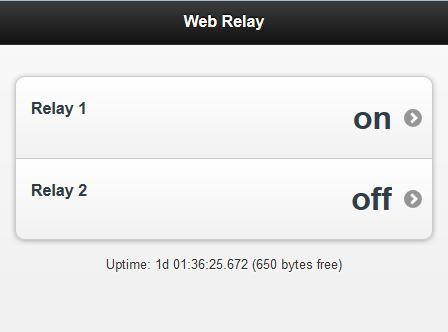
I have however managed to write a nice web server that runs  on some hardware (m328 aka arduino micro) Derek shipped my way.  My next task is to xAP enable this.

Some screenshots of the hardware. The green pcb is custom the others are just off the shelf components.

http://www.flickr.com/photos/kenned/8939718885/lightbox/
http://www.flickr.com/photos/68384054@N03/9606020148/

Ethernet Web GUI

Brett

I never really got properly set up with the Home Automation Hub as I had too many other things going on.

However, I did reach the point where I could switch an LED on and off on a connected Arduino using a 'tweet' from Twitter.


Having recently become the proud owner of a Pebble Smart Watch it crossed my mind that it should be possible to control the Home Automation Hub using the Pebble watch and that using Twitter to do this could be one solution.

As this post describes, it is possible to use Tasker to send tweets,

http://www.pocketables.com/2013/05/how-to-tweet-using-tasker.html

and as the Pebble watch can be used to operate Tasker, (using 'PebbleTasker') the full fnctionality can be realised.


It will be some time before I have the time/opportunity to try this out, but i thought others with a Pebble Watch and a Home Automation Hub might find the above useful.

Just moved house so time to setup everything afresh. I seem to have forgotten lots of stuff during the move but all coming back to me slowly. All the roomnodes now seem to have flat batteries. Probably because they were waiting for ack from hah. Going to get all my nodes set up in each room then start publishing to xively. Just spent a couple of hours wondering why one node was working fine and publishing but another wasn't. Then fired up XAP on the ipad and realised it wasn't transmitting :)

Also working on an app for an android tablet. I have the floor plan so intend to create an app based on that and have each room separate. 

No need for heating control now as new house control is very well thought out but need to monitor gas meter and this one is different than the last so need a different style reed switch. 

I was a little disturbed when I saw the house being built and saw all the foil being installed in the cavities but this doesn't seem to have reduced roomnode reception. Looks like this house is going to be a LOT cheaper to run but still want to monitor whatever I can.

I may have a few bits of kit that I will no longer need so I will post on here if anything is going spare. I'd rather share it within our little community than throw it.


I'M BAAAAACK :)

Hi Guys,

This has probably been discussed somewhere but it didn't show up in search.

I was wondering if it was possible to hook HAH Plugboard up to IFTTT?

This seems to be the ideal way for ludites like myself to get around the "tricky" issue of LUA programming.

Any thoughts on this?

Cheers

Gary

We are shifting to our new house so I'm thinking of getting a home automation setup. I want to be able to control lights (well, lamps really), home theater (mostly audio, including set zones around the house) from a central touch screen/smart phone/web interface. I'm also looking into pet feeders as well, that you can load up with dry food and set to a timer. Will list down some more things that could be automated.

However, I am unable to decide which brand to go for or where to get more information on home automation. I want to be thorough before making any decision.

http://www.marshall-tufflex.com/shop/section.php/581/1/voltis_home


Voltis Home offers substantial savings on domestic electricty bills and also helps you to be kinder to the environment.


  • Reduces energy usage and carbon footprint

  •  Increases the life of household appliances

  •  Easy to install by a qualified electrician

  •  Greater savings compared to other systems


Product code
VH60HD
Temperature range
-10 to 40°C
Humidity
Up to 90%
Dimensions
300mm(w) x 240mm (h) x 147mm (d)
Weight
14kg
Rating
60Amps in Save
(100Amps in Bypass/Mains)
Suitable for incoming voltage of
230 – 253Volts

  NB. On the rare occasion that the typical incoming voltage to a building is below 230Volts, please contact us.


Incoming voltage check
Voltis Home is suitable for virtually all homes. We do however recommend electricians measure the incoming voltage prior to an installation. Should incoming voltage be below 230Volts, for further advise please contact our Technical hotline on +44 (0)1424 856688.

How is Voltis Home installed?

The unit is installed between the electricity meter and consumer unit. Installation is very straightforward, but must be carried out by a qualified electrician. Voltis Home will start saving money from the moment it is installed.


For more information on Voltis Home please visit www.savepowerathome.co.uk

I think they would need to be installed in the order.


1.      Meter

2.      Junction box with solarPV

3.      This unit

4.      Consumer unit


Reason for my thinking is the solar pv generates a higher than grid voltage and if it was on the wrong side of this unit problems could occur.


What do you guy's think? And does anyone have any experience of them?
I was in the market for a cheap logic analyzer so I thought I would try out this:

http://dx.com/p/logic-analyzer-w-dupont-lines-and-usb-cable-for-scm-black-148945

Using version 1.1.46 of the USBEE software which won't ZAP the firmware and render it a brick it turns out this little sucker is pretty good.

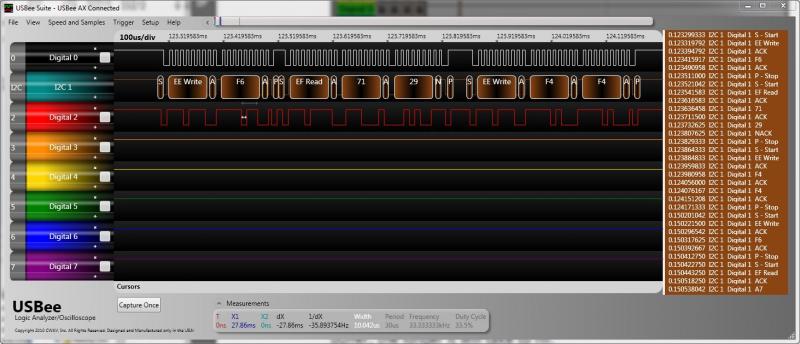
Here is a screenshot of me decoding the I2C traffic between an arduino and a BMP0085 pressure sensors I've been play with.

A little about the screenshot attachment usbee-ax.jpg

Digital 0 - is the I2C SCL (Clock line)
Digital 1 - is the I2C SDA (Data line)
Digital 2 - is a duplicate of the Digital 1 so you can see the raw pulse train before automatic decoding.

Next to try some of those RF and IR pulse trains I've been meaning to get around to figuring out.

Brett