Example Scripts

Description

A place where scripts developed by users can be shared. Please make sure that all submissions are well commented.

Found this script and adopted a bit for hah when was looking for a way to schedule Xmas lights on/off events.

Calling as /etc/plugboard/suntimes.  Added txt extension on attached and EOL is in Windows format.
Edit for your geographical location, from applet can be called e.g. like below:

local suntimesfile = "/tmp/suntimes"..os.date("%Y%m%d")..".txt"
local suntimes = nil
suntimes = io.open(suntimesfile, "r")
if suntimes == nil then
  os.execute("/etc/plugboard/suntimes")
  suntimes = io.open(suntimesfile, "r")
end
for line in suntimes:lines() do
  sunrise = string.sub(line, 1, 4)
  sunset = string.sub(line, 6, 9)
end

Regards,
Aivo

Hi Brett,

I'm trying to fix some of the "broken" things in my system and keep looking through the samples on my HAH but all I have are the old ones?

In particular I'm looking for the bindRelaysApplet but this only exists with the -base extension and is old too.

My HAH is running Build: 296/1.0


What am I missing?

Here is a simple (perhaps simplistic) script for controlling an electrical appliance connected to an RF device.

This script takes a simplistic approach to using excess PV solar output. Basically is assumes that if you have more than 1400 watts of output that you can switch on the appliance connected to an RF plug. When the output drops below 1100 watts the device is switched off again.

The script builds in a delay of 60 seconds to stop the device being repeatedly switched if the solar output is changing rapidly in an attempt to prevent damage to the device which is attached.

The script is written to test for current cost sensor 1 as the PV output source and to use the new Lidl remote control socket (B) as the RF device. Obviously these devices should be changed to suit your setup.

Any comments would be most welcome.

This applet allows you to SEND a command to an email account which the HAH monitors.

It works like this:
In the subject line you can specify one of the following

  • xap-raw
  • xap-short
  • xap-alias

These are all configured via a lookup table so feel free to make up your own commands if you wish.

Depending on what you have here the content has variant behaviour:

  • xap-raw - means the body must be a fully compliant xap packet.
  • xap-short - you can use my xap short encoding format.
  • xap-alias - it will send a xap payload that is conformat to that which you get from xap-twitter and xap-googlecal, so you also need the aliasApplet.lua running if you want to catch these and perform some action.    To refresh you memory that xap packet will look like this  http://www.dbzoo.com/livebox/hah#calendar_aliases  The body of a xap-alias must only have 1 line, well only the 1st will be taken in any case.

You'll need to adjust the obvious settings for configuration of the email and pop server.

Installation:

  1. Copy the pop3Applet.lua into the /etc/plugboard directory.
  2. The other files must be put into the directory /etc/plugboard/pop3

That is quite important otherwise it just won't work.

The POP port is hardcoded to 110 and username/password will be cleartext.  Secure MD5 (APOP) is supported via port 110 too - Plenty of online MD5 generators - http://www.miraclesalad.com/webtools/md5.php

A more secure connection would be like this - note: this is NOT SSL and GMAIL *only* accepts SSL, so this won't work with a gmail account or possibly others that only allow secure connection types.  I've not tested them all, but it works for me.

local popConf = { 
                   host="pop.dbzoo.com",
                   user="testing@dbzoo.com",
                   pass="MD5HASH OF PASSWORD",
                   secure=true
                } �

Example email using a SHORT message

subject: xap-short
body:
xap-header
{
class=xAPBSC.cmd
target=dbzoo.livebox.Controller:relay.1
}
output.state.1
{
id=*
state=toggle
}

Example alias command - and you must have something running to pick up this message, like the aliasApplet.lua !

subject: xap-alias
body:
relay 1 on

This is a script for automatically uploading live data to PVoutput.org for people who use a Current Cost meter for monitoring and recording output from Solar PV systems. It is formatted as a plugboard applet and should be loaded into /etc/plugboard. It also requires a file called CumulativeKwH to be present in the same directory which should contain this single digit 0 (zero) on startup. This file is automatically zeroed again each evening to start the following day with a zero accumulated production figure.


In my experience the CC meters tend to overread the PV output quite significantly at very low output levels so there is a built in reducing factor to account for this. You may need to adjust some of the figures to make your output accurate. It should be fairly clear from the script what is happening.

I've been running the script for a couple of weeks now and it seems fairly stable another member has also had a similar experience.

Hope someone finds it useful.

Incidentally Opera seems unable to upload files to this site but have finally managed to upload the script using Firefox.

This applet emits a targetless clock schema payload that can be picked up by other xAP devices to display the current date/time.

It's very simplisitic and demonstrates some of the formatting capabilities of the LUA os.date function and the xap.Timer

See the LUA references page for more os.date formatting options http://www.lua.org/pil/22.1.html

The output not quite what you want?..... go ahead and hack away!

Sample output:

xap-header
{
uid=FF00D800
source=dbzoo.livebox.Plugboard
hop=1
class=clock.report
v=12
}
date
{
utc=14:25:09
}
prettylocal
{
long=02:25 PM Tuesday, 18 October 2011
time=02:25 PM
short=02:25 PM 18-Oct-11
date=18-Oct-11
med=02:25 PM Tue, 18 Oct 11
}
time
{
utc=10/18/11
}

Brett

This set of scripts show how to send an email encoded as a MIME type so you can transmit HTML email.

In this example we use a simplistic template engine (lte.lua) that uses LUA, naturally, as its scripting language.  The template understand the following tokens.

  • {{ }}  - Will import a value into the output stream
  • {% %} - execute a LUA code fragment
  • {> >} - output the contents with HTML escape characters.

Here is what our TEMPLATE (relay.tmpl) looks like:

<h1>Relay event</h1>
{%
 state = f:getValue("output.state","state")
 if state == "on" then color = "green" else color = "red" end
 id = f:getValue("xap-header","source"):sub(-1)
%}
The relay {{id}} is <font color="{{color}}">{{state}}</font>

The event was
<pre>
{{ tostring(f) }}
</pre>

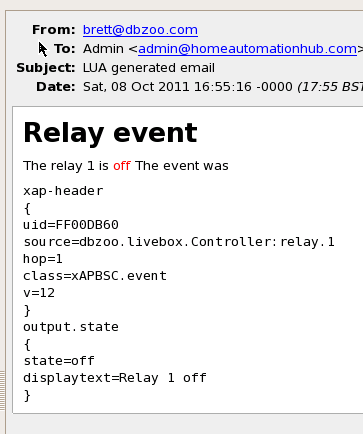
and here are some emails that will be generated by this template and the attached Applet
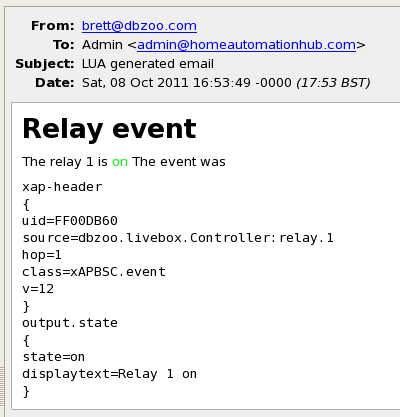
Relay event on email message

Relay Event off

you will need to tweak this sample and adjust for your own username, password, SMTP server,  Port and email addresses. Normally SMTP will use port 25 my provider likes to be tricky so you'll see in the script 2525.

The LTE script is not an applet but is required to placed into the /etc/plugboard directory. This is the TEMPLATE engine and I refactored it out of the applet so it could be reused and understood seperately.

Enjoy,

Brett
A simple example to show how to send out an email on a state change.

Whenever relay 1 changes state an email is sent - very contrived to keep it simple.

Brett

Hi,

I've built a script, which is saving the RF states on change events into a .ini file and restoring these values after a livebox reboot, so the states as seen on the livebox and the real states are equal.

Hope somebody can use this code!

Markus from Linz, Austria

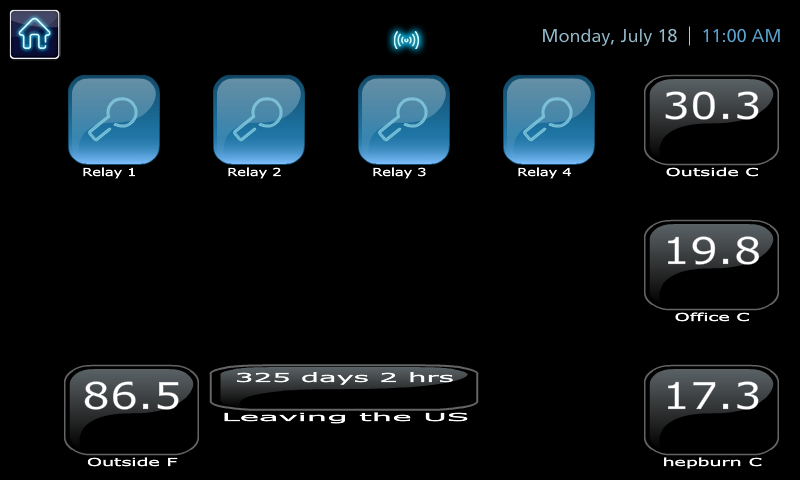
I wanted to show the number of days I have left in the US before I depart for Australia so I thought hey an applet would do the trick and I can display this on the Joggler.  Here is what I did.

The configuration on the joggler just required the following XML fragment.

                <button NAME="leaving">
                        <label><text>Leaving the US</text></label>
                        <gridX>1</gridX>
                        <gridY>2</gridY>
                        <width>*3</width>
                        <height>*.5</height>
                        <bsctext>
                                <fontcolour>0xFFFFFF</fontcolour>
                                <fontsize>12</fontsize>
                        </bsctext>
                        <xAP>
                                <schema>xAPBSC</schema>
                                <uid>FF00D805</uid>
                                <source>dbzoo.livebox.plugboard:US</source>
                        </xAP>
                        <mode>text</mode>
                        <hide>state</hide>
                </button>

In case you where wondering Hepburn is that's my daughter I've got a wireless jeenode in her room so I can check what temperature it is in there. Bit of a warm one today...  :)

Brett