Example Scripts

Description

A place where scripts developed by users can be shared. Please make sure that all submissions are well commented.

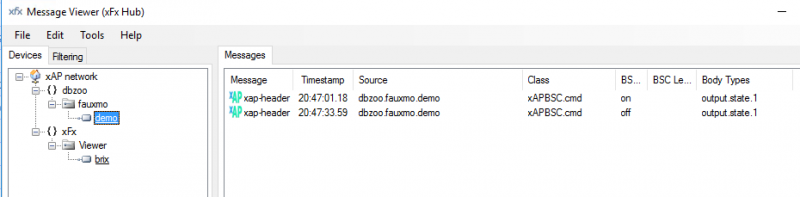
Its been a very long while since I've last posted.  Derek got me inspired to look at Alexa controllable xAP endpoints.  As a proof of concept I took the faxumo code and made a few very minor modifications to prove it can act as a bridge to control xAP too.

./fuaxmo.py

Alexa discover devices

<Wait 20s for it to find the fake control points fauxmo has created>

Alexa relay 1 on
Alexa relay 1 off

I've been struggling to write a lua script to correct some xively data which is not correct. I'm having terrible trouble getting it to work. Perhaps someone could spot what I'm doing wrong. Any help appreciated.

The idea is to update the data points on feed id 8 with data that is more realistic. (My 1 wire bus went belly up and reported

a temperature of 85 degrees for 20 minutes)

Here is the script which I was hoping would update the feed. (Just a couple of minutes worth at a time)

require("xap")
require('ltn12')
local socket = require("socket")
local http = require("socket.http")


local XivelyID = 461052594
local XivelyKey = "jny---*****---xzni1R"
local XivelyURL = "https://api.xively.com/v2/feeds/"


function init()
 
local json_data = string.format(
[[{
"version":"1.0.0",
"datastreams": [{"id" : "8","datapoints":[{"at":"2015-11-13T17:31:20.620426Z","value":"19.6"},{"at":"2015-11-13T17:30:21.078244Z","value":"19.6"}],}]
}]])

  local response_body = {}
  local response, status, header = http.request{
                method = "PUT",
                url = XivelyURL..XivelyID,
        headers = {
            ["Content-Type"] = "application/json",
            ["Content-Length"] = string.len(json_data),
                        ["X-ApiKey :"] = XivelyKey
            },
        source = ltn12.source.string(json_data),
                sink = ltn12.sink.table(response_body)
              }
    response_body = table.concat(response_body)
    print(response_body)
    print(status)
        print(header)
os.exit()
end


xap.init("dbzoo.lua.xivleyupdatetest","FF005D00" )
init()
xap.process()


The error message says: {"title":"Unauthorized","errors":"You do not have permission to access this resource"}

Somebody posted about how to control lightwave RF devices using UDP if you already have the wifi controller and integrate this into the joggler.  What you need is a BSC to Lightwave proxy.

Something like this.  I've not tested this as I don't have any lightwave devices nor the controller but I think you get the idea of how simple this is to do.

-- Create a BSC level endpoint that acts as a proxy for sending
-- UDP packets to a lightwave wifi controller.

module(...,package.seeall)
require "xap"
require "xap.bsc"

info={version="1.0", description="Lightwave to BSC adapter"}
-- A table of mappings
-- dbzoo.livebox.Plugboard:lw.light -> UDP ON/OFF
--
--Example: The command  000,!R1D1F1|  means room 1 ("R1"), device 1 ("D1"),
-- switch on ("F1").  Conversely  000,!R1D1F0|  would mean switch off.
-- The "000" is a command reference, (so you increment it for each command in turn).
map={
   {source="lw.light1", on="000,!R1D1F1|", off="000,!R1D1F0|"},

-- Add more endpoint mappings here....
}
HOST="lightwave.wifi.host"

function udpSend(packet)
--   print("sending "..packet)
   local udp = socket.udp()
   udp:sendto(packet, HOST, 9760)
end

function init()
   for _,v in pairs(map) do
      bsc.Endpoint{name=v.source,
           direction=bsc.OUTPUT,
           type=bsc.BINARY,
           cmdCB=function(e)
                udpSend(v[e.state])
             end
        }
   end
end

Well here is my rough attempt at BT presence detection. The scripting works fine but I'm struggling with getting the Iphone to respond to the INQ call unless its displaying the Dicovery screen. Not particularly usefull!.

Not sure if there is a way round this yet but I have posted this rough draft anyhow as andorid users, etc, might have more luck.

The HC05 device i purchased had 6 connections on the breakout board. 3.3V, 5V, Rx, Tx, ground and Key. these fit quite neatly onto a jeenode port using the A pin for the key (used to switch the module into command mode), digital and Interupt pins for Rx and Tx, power and ground as described.

The jeenode code communucates using software serial leaving the hardware serial for dedugging, etc.

It sends the AT+INQ command every 30 seconds and forwards the first 10 characters of any addresses found via seperate payloads back to the HAH xapserial via the HAHcentral node. If none found "OOOOOOOOOO" is sent anyway for the lua script to deal with and ensure the node doesn't get "reaped".

This is messy but with my basic BT knowledge it appears the BT addresses can be of varying lengths so for simplicity I have just sent the first 10 characters for now.

The addresses to search are currently coded in the blueNode.lua file. These should really be in the jeenodeApplet so that the configuration is seperated but I havent got round to this bit yet.

Your jeenodeApplet will need modifying as per the example.

As soon as an address matching those in the blueNode.lua are seen, the associated endpoint switches ON, if the address is not seen for 5mins the endpoint is switched off.

I have tested and it seems to work OK, if a bit rough round the edges.

I'm off to try to fix the iphone issue, will tidy more if I get it sorted.


Garry.

Hi all,

I need to use dynamic DNS services to control HAH away from home. My router only works with Dyndns.com which is not free anymore and I let my free account expire! DOH.

Anyhow, I have registered with no-ip.com for a free account and written the following script to check and update noip servers if my local IP changes.

I saved the following script as a file (eg noipupdatescript) in /etc directory and chmod a+x it to make it executable. 

Then set cron to run it every 15 mins or so like so:

0,15,30,45 * * * * /etc/noipupdatescript

Then if your ip has changed when checked the script will send new address to noip and tweet the response so you can see if it was successful or not. 

Cheers

Garry.


heres the script:


#!/usr/bin/lua
-- $Id$
require("string")
require("pl")
require("pl.xml")
require("xap")
require("xap.bsc")
local http=require("socket.http")
local username="username here!"
local pass="pass here!"
local domain="mydomainhere!.no-ip.biz"
if (io.open( "/etc/www/ipaddress.cfg", "r" ) == nil ) then
io.open("/etc/www/ipaddress.cfg", "w"):close()
    else
end    
 
local t=pretty.read(file.read("/etc/www/ipaddress.cfg"))
if(t == nil) then t={ipaddress = "0.0.0.0"} end
if(xmlstring == nil) then return end
local d = xml.parse(xmlstring)
data = d:match [[
<lookup>
<ip>$IP</ip>
</lookup>
]]
if data.IP ~= t.ipaddress then
 local response = http.request("http://"..username..":"..pass.."@dynupdate.no-ip.com/nic/update?hostname="..domain.."&myip="..data.IP)
t.ipaddress = data.IP
file.write("/etc/www/ipaddress.cfg",pretty.write(t))
xap.init("dbzoo.livebox.Plugboard:Noip","FF00DF99")
bsc.sendText("dbzoo.livebox.Twitter",response)
else
end


Here is a basic script that monitors a HAHnode's light level and triggers an action based on the current reading.  The script has been written as a framework that can/should be developed.  

There are a few comments in the code that will help those just starting.


Karl

More of a proof of concept that anything useful.

--[[
    Pachube push via LUA
--]]

module(...,package.seeall)

require("xap")
require('ltn12')
local socket = require("socket")
local http = require("socket.http")

info={
   version="1.0", description="XAP LUA to Pachube"
}

local pachubeID = 13058
local pachubeKey = "xxxxx"
local pachubeURL = "http://api.pachube.com/v2/feeds/"
local pachubeTbl = {
  ["dbzoo.cheese.jeenode:3.temp"] = 1,
  ["dbzoo.cheese.jeenode:4.temp"] = 2
}

function pachubeDispatch(frame)
  local id = pachubeTbl[frame:getValue("xap-header","source")]
  local value = frame:getValue("input.state","text")

  local json_data = string.format(
[[{
"version":"1.0.0",
"datastreams": [ {"id":"%s", "current_value":"%s"}]
}]], id, value)

  local response_body = {}
  local response, status, header = http.request{
                method = "PUT",
                url = pachubeURL .. pachubeID,
                headers = {
                           ["Content-Type"] = "application/json",
                           ["Content-Length"] = string.len(json_data),
                           ["X-PachubeApiKey"] = pachubeKey
                          },
                source = ltn12.source.string(json_data),
                sink = ltn12.sink.table(response_body)
              }
end

function init()
  local f
  for k in pairs(pachubeTbl) do
     f = xap.Filter()
     f:add("xap-header","source",k)
     f:add("xap-header","class","xAPBSC.event")
     f:callback(pachubeDispatch)
  end
end

Hi All,

Firstly - A special thanks to Brett for extending the LCD Buffer in 307.2 Avio for some example code and Mark Baldwin for modifying the AVR code and bug finding :)

I have commented the code to the best of my knowledge, Configurable options are detailed below

My current setup is a 20x4 LCD but in theory any multiline HD44780 character LCD could be used with the relevant AVR mods

lcdcols = set to LCD length i.e 20 columns

refresh = time in seconds to check for updates (higher refresh may become annoying with lcd flickers)

fill = currently set to space, you can use any character but spaces work best imo unless you want dots and dashes

Line1-3 = if changing the pre data text be sure to set at both ends (if LCD is less than 20 Columns you may need to shorten these to avoid overrun)

Prefix1-3 = set as a data source prefix, i.e "Phase 1" for a feed where no identifier is provided

Unit1-3 = set as a data source suffix, i.e oC for temp, Watts for power etc (note the leading space for neatness not always required)

additional feeds can be added if required i.e "("xap-header", "source", "dbzoo.livebox.jeenode:livingroom.temp")"

be sure to set the correct channel where required - "dbzoo.livebox.Controller:1wire.1"

Line4 is currently set to a 4 digit clock - if you wish to use Line4 for a data feed, simply remove "Line4 = "        "..os.date("%H:%M")" from the update timer and add relevant code for the data feed

Version 2 will work towards scrolling text and a status line for RF / Relay data

**************************************************************************************************************************

module(...,package.seeall)
require("xap")

info = {version="1.0", description="20x4LCDInfo"}

lcdcols = 20 -- Specify for LCD Row length
refresh = 10 -- Refresh period in seconds for collecting values and sending to LCD
fill = " " -- Char used to fill blank LCD colums

Line1 = "Waiting for Data - 1"..string.rep(fill, lcdcols - string.len("Waiting for Data - 1")) -- Sets Line Var to contain basic text until overwritten with Catch routines
Line2 = "Waiting for Data - 2"..string.rep(fill, lcdcols - string.len("Waiting for Data - 2"))
Line3 = "Waiting for Data - 3"..string.rep(fill, lcdcols - string.len("Waiting for Data - 3"))

Prefix1 = ""
Prefix2 = ""
Prefix3 = "Phase 1 "

Unit1 = " oC" -- Customisable Units (note the space prefix)
Unit2 = " oC"
Unit3 = " Watts"
 
function init() -- Sets up 3 filters
  Filter1 = xap.Filter()
  Filter1:add("xap-header", "source", "dbzoo.livebox.Controller:1wire.1")
  Filter1:callback(catch1wire1) -- A temperature change in the filter will trigger the Catch1wire1 routine
 
  Filter2 = xap.Filter()
  Filter2:add("xap-header", "source", "dbzoo.livebox.Controller:1wire.2")
  Filter2:callback(catch1wire2)
 
  Filter3 = xap.Filter()
  Filter3:add("xap-header", "source", "dbzoo.livebox.CurrentCost:ch.*")
  Filter3:callback(catchCurrentCost)
  
  send2lcd("Waiting for Data") -- Test LCD at applet start
  xap.Timer(update, refresh):start() -- Starts update routine timer with a 10 second interval
end

function catch1wire1()
  Value1 = Prefix1..xap.getValue("input.state","displaytext") -- Sets Value1 as 1Wire data
  Line1 = Value1..Unit1..string.rep(fill, (lcdcols - string.len(Value1) - string.len(Unit1))) -- Sets Line1 Var with 1Wire data (Value1) and appends Unit1, fills remaining Lcd colums with spaces
end

function catch1wire2()
  Value2 = Prefix2..xap.getValue("input.state","displaytext")
  Line2 = Value2..Unit2..string.rep(fill, (lcdcols - string.len(Value2) - string.len(Unit2)))
end

function catchCurrentCost()
  Value3 = Prefix3..xap.getValue("input.state","text")
  Line3 = Value3..Unit3..string.rep(fill, (lcdcols - string.len(Value3) - string.len(unit3)))
end

function update(self) -- Timer routine
  Line4 = "        "..os.date("%H:%M") -- Sets Line 4 as basic clock
  lcdstring = Line1..Line2..Line3..Line4 -- Conbines all LCD Lines1-4 into one string ready to send to the LCD every 10 seconds
  send2lcd(lcdstring) -- Sends to LCD
end

function send2lcd(lcdstr) -- LCD Routine
  xap.sendShort(string.format([[xap-header
   {
    target=dbzoo.livebox.Controller:lcd
    class=xAPBSC.cmd
   }
  output.state.1
   {
    id=*
    state=on
    text=%s
   }]], lcdstr))
end
I added a socket to the airwick enclosure and connected up another temperature gauge.  Was pleased

to find that roomnodetwin worked with all the airwick stuff.  

But then found the +50/-50 degree problem when I came to measure the pipe temperatures.

So attached is a relatively simple (wasn't for me!) update to BoilerNode.lua which gives the correct

temperatures.  Also attached my jeenodeapplet.lua for the three airwicks.

Feed is at https://cosm.com/feeds/13194

Regards

Kim