Hi,
I tried almost everything, but my jeenodes do not work.
In the attachment you can find my applets, they are quite similar to the given examples here.
My problem so far:
I managed to be able to initialize the basenode as well as the outputnode.
Also the serial port is correct, as I verified several times!
Member for
15 years 7 monthsMarkus,What version of the
Markus,
What version of the HAH firmware are you on, there was a Xap-serial bug fixed recently that affected outputnodes. Is xap-serial still running?
I use output nodes fine so will check my scripts with yours later when I get home.
Garry.
another thought, did you setup output node ID as 2? Also are you using the no config HahCentral script?
Member for
15 years 4 monthsLatest Version, updated today
Hi Garry, thanks for your fast reply.
I am using the latest firmware, just updated today.
xap-serial is running and now (in opposite to the older firmware) doesn`t crash any more.
And yes, the output node has ID 2 with no config HahCentral.
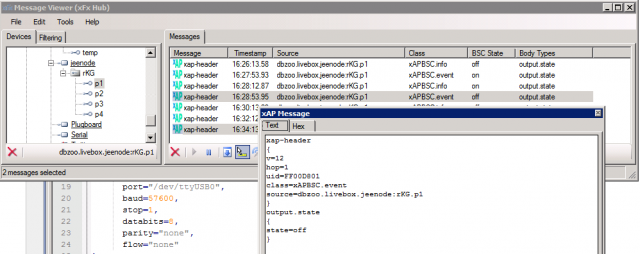
When I look at serial within xfx-viewer, I can see only the noise data (? 6 135 190 ...), but never correct data (OK ...).
I can verify, that the jeenode states are set "on" and "off" on the HAH correctly, so the scripts seems to be OK. So in the background the HAH should send the corresponding serial commands automatically, isn't it? How can this be verified?
Member for
15 years 7 monthsI will verify later when I
I will verify later when I get back to my machine but I think you should see a serial.comms class xap message sent from plugboard to xap-serial.
the data sent will be 1,48,2 s (from memory) first digit is port, second is ascii 0. (Off) third is jeenode ID and then s for send.
try connecting to base node directly with microcom after killing xap-serial and type the above data in manually, or 1,49,2 s for on.
If this fails also then I would suggest going back to HAhCentral with config and double checking your frequency, I had an issue where it was changed by error. No config version doesn't report so its not easy to tell if its correct. Is the id set as 1 on the base node?
ill keep thinking!
Garry
Update:have noticed that I did modify the output node sketch quite heavily when then initial buffer issue existed. As such I send 1,1,2 s. not 1,49,2 s
the point of this is that I have noticed the output node sketch on google code seems to want ascii characters for the port ID too?!
maybe try sending 49,49,2 s and see if this works. If so there is a bug in output node sketch.
Should possibly be:
Member for
15 years 4 monthsmicrocom
I tried to kill serial and start microcom:
# microcom -s 57600 /dev/ttyUSB0
[RF12nocfg.1] A i1 g212 @ 868 MHz
Current basenode configuration:
A i1 g212 @ 868 MHz
? 33 58 110 154 231 251 163 114 238 59 7 132 184 167 7 28 39 177 214 77 95
#
But within microcom I cannot type any command or something else, the only thing that works is ctrl+x for exiting microcom.
The cable is the original from the shop, so it seems to me, as if my 2 jeenodes are not fully functional.
Thank you for further support. Unfortunately I will not be able to test again before sunday, but I absolutely want to solve this problem...
Markus
Member for
15 years 7 monthsAgain, been a while so its
Again, been a while so its from memory but I don't think the characters show on screen while in microcom. Just type them anyway and press enter.
Concerned your not seeing the reported data back from your output node though (every 5 mins). Do you not get any good data if microcom left open for a while?
We can pick this up on Sunday. Well get to the bottom if it!!
garry
Member for
15 years 7 monthsTesting jeenodes
Just remembered that to test jeenode functionality you can flash both nodes with the rf12demo sketch and power one remotely (flashed with ID 2) and connect the other to a serial port(ID 1)
send 2 a command via the serial port to ID1 and all being well the remote node wil ack receipt, proving jeenodes are operating correctly.
This may work with two HAHcentral nodes, I've never tried it
Garry
Member for
16 years 10 monthsYou can drive the Output node with the RF12DEMO sketch
You can drive the Output node with the RF12DEMO sketch and not use ANY of the HAH infrastructure.
So I would start there as a 1st step this will prove there is comms between the two units and that you can control it using basic command sequence. After that you can reflash the base node with HAHCentral and integrate with the rest of the system.
Using RF12DEMO you can drive it with strings like this
nodeid,port,state s
So for example as your output node is configured as 2. To enable Port4 you would use
2,4,1 s
And to turn off port 4
2,4,0 s
These commands can be entered directly at the command line prompt in the HAH Central sketch or RF12DEMO.
Not sure if it will help but I uploaded a Sequence diagram to the output node section to show process flow.
Be aware if you restart xap-serial you MUST restart the plugboard so the Serial.Setup message is sent again.
http://www.dbzoo.com/livebox/hah_hahnode#output_node
Brett
Member for
15 years 7 monthsBrett, is that correct? I
Brett, is that correct? I thought the data structure was:
Therefore port 4 on would be 4,1,2 s
it also appears the output sketch requires ascii characters ie 52,49,2 s
Am I missing something somewhere? My output node are heavily modified so cannot remember how they worked when in "virgin" state
thanks
Garry
Member for
16 years 10 monthsI'm slipping
OK in the Output node we do this.
function OutputNode:portCmd(e)
-- The output port is the last character of the key (a little kludgy)
local port = e.key:sub(-1)
self:sender(port ..","..string.byte( utils.choose(e.state=="off",0,1)))
end
So the first bit is PORT,STATE
Then we pass this DATA into here:
function Nodule:sender(data)
xap.sendShort(string.format([[
xap-header
{
class=Serial.Comms
target=%s
}
Serial.Send
{
port=%s
data=%s,%s s
}]], self.cfg.target, self.cfg.port, data, self.cfg.id))
end
So we get PORT,STATE,NODE s
OK I'm wrong I can't even read my own code, how bad am I !
UPDATE: Only the ON/OFF is required to be an ASCII value. No sure why that was but there go.
Port 4 ON (49) to node 2.
4,49,2 s
Brett
Member for
16 years 10 monthsNow that is curious in the
Now that is curious in the SKETCH it IS assuming both the PORT and the STATE are ASCII values.
static void doIncoming() {
byte port = rf12_data[0] - '0';
if(port < 1 || port > 4) return;
byte state = rf12_data[1] -'0';
if(state > 1) state=1;
setPort(port, state);
}
So does that mean there is a bug in the outputnode.lua code?
local port = e.key:sub(-1)
Should really be.
local port = string.byte(e.key:sub(-1))
Gary did you make any modifications to the sketch? Or are you running a native output node?
Member for
15 years 7 monthsBrett, I did modify the lua
Brett,
I did modify the lua and sketch so that it didn't send ascii values at all for either port or state as I had an issue with the memory allocation if you remember. Ive not bothered swapping it back since you fixed the issue.
I have therefore never tested a virgin output node on the code aince you fixed the memory issue.
Looks like I may have dodged the bug but for other reasons.
Garry
Member for
16 years 10 monthsCan't believe output node has been broken for so long
Gary indeed you did I've been playing with it and its broken for me.
I've checked in a couple of changes that should sort it out so it will work as I first stated Not with ASCII representations of the numbers.
I've pushed beta 309.2 which has a modification to the outputnode.lua.
The STATE is no longer send in ASCII form, it goes native a 1 is a 1 (not 49 !). I've made a couple of changes to the backend outputnode sketch to match. I also made changes to HARDCODE a node ID and not use EEPROM save doing the two step setup, just compile and flash.
http://code.google.com/p/livebox-hah/source/detail?r=454
Brett