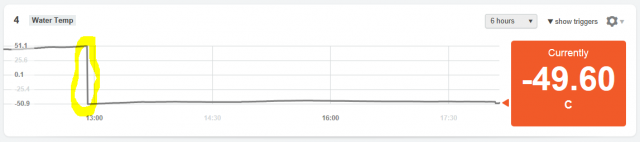
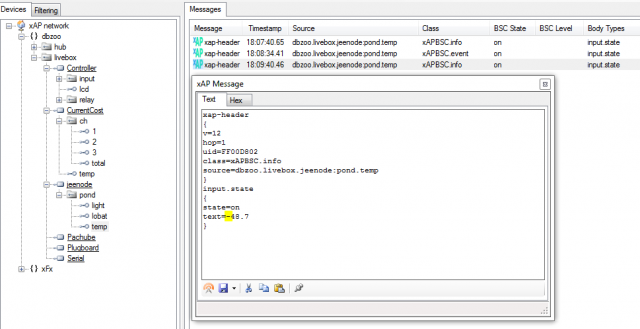
Today ‘out of the blue’ the temperature sensor from my RoomNode switched from Positive to Negative values please see the attached 2 screen shots, I’ve tried removing the batteries from the RoomNode to see if this might reset it, it hasn’t so far. Can anyone help/advise?
Member for
14 years 7 monthsand now it's flipped back
Member for
15 years 10 monthsFound the problem and a soloution
Check out this thread :)
/content/temperature-measurement-hahnod…
I cannot figure out how to upload files to here so download
http://www.packetradio.co.uk/jeenode0to100.zip
and put the contents (after unzipping) into \etc\plugboard
seems ok on my setup (which is the same as yours as i sent you my jeenode applet. (but my sensor never goes over 50 as i cannot get it close enough to the middle of the tank :()
Member for
14 years 7 monthsThanks trying this now!
Thanks trying this now!
Member for
15 years 10 monthsTried it on my system nd it went negative
anyone shed any light?
boilernode.lua
--[[ boilernode.lua
Use in conjuction with the RoomNode JeeNode sketch.
Copyright (c) Brett England, 2011
No commercial use.
No redistribution at profit.
All derivative work must retain this message and
acknowledge the work of the original author.
--]]
module("boilernode", package.seeall)
require("xap.bsc")
jeenode = require("xap.jeenode")
Nodule = jeenode.Nodule
class = require("pl.class").class
class.BoilerNode(Nodule)
-- create BSC endpoints
function BoilerNode:build(...)
Nodule.build(self, ...)
-- Creates the endpoints: self[key] as in self.light, self.moved etc..
-- If the user has configured that they want them that is.
self:add {key="light", direction=bsc.INPUT, type=bsc.STREAM}
self:add {key="moved", direction=bsc.INPUT, type=bsc.BINARY}
self:add {key="humi", direction=bsc.INPUT, type=bsc.STREAM}
self:add {key="temp", direction=bsc.INPUT, type=bsc.STREAM}
self:add {key="lobat", direction=bsc.INPUT, type=bsc.BINARY}
end
function BoilerNode:process(data)
--[[
-- From the RoomNode.pde Sketch
struct {
byte light; // light sensor: 0..255
byte moved :1; // motion detector: 0..1
byte humi :7; // humidity: 0..100
int temp :10; // temperature: -500..+500 (tenths)
byte lobat :1; // supply voltage dropped under 3.1V: 0..1
} payload;
--]]
local li, mo, hu, te, lo = jeenode.bitslicer(data,8,1,7,10,1)
te = te / 10
-- The keys here must match the key values from the self:add{key=x}
Nodule.process(self,{light=li,moved=mo,humi=hu,temp=te,lobat=lo})
end
jeenode.lua
--[[
JeeNode to xAP Endpoint mapping
--]]
--_DEBUG=1
module(...,package.seeall)
monitor = require("xap.jeenode").monitor
RoomNode = require("xap.roomnode").RoomNode
BoilerNode = require("boilernode").BoilerNode
OutputNode = require("xap.outputnode").OutputNode
IRNode = require("xap.irnode").IRNode
info={
version="2.0", description="JeeNode"
}
local jeemon={
port="/dev/ttyUSB0",
baud=57600,
stop=1,
databits=8,
parity="none",
flow="none"
}
-- Keyed by NODE ID
local nodes = {
[2] = RoomNode{base="dbzoo.livebox.jeenode:pond", endpoints={light=1,temp=1,lobat=1}, ttl=1800},
}
function init()
monitor(jeemon, nodes)
end
Member for
15 years 11 monthsHere's mine that works
Feed 6 on https://cosm.com/feeds/13194?pachube_redirect=true - should really be called tank node - 'cos its measuring
hot water tank not the boiler temp.
I have two luas in plugboard - called "boilernode" and "jeenodeApplet.lua"
Note this is running off a second livebox as you can see by the "target="dbzoo.livebox.2.serial" - in the jeemon section of
the jeenodeApplet.lua file
1. boilernode.lua contains:
------------------------------------------------------------------------------
--[[ $Id: roomnode.lua 269 2011-09-07 19:35:56Z dbzoo.com $
Use in conjuction with the RoomNode JeeNode sketch.
Copyright (c) Brett England, 2011
No commercial use.
No redistribution at profit.
All derivative work must retain this message and
acknowledge the work of the original author.
--]]
module("boilernode", package.seeall)
require("xap.bsc")
jeenode = require("xap.jeenode")
Nodule = jeenode.Nodule
class = require("pl.class").class
class.BoilerNode(Nodule)
-- create BSC endpoints
function BoilerNode:build(...)
Nodule.build(self, ...)
-- Creates the endpoints: self[key] as in self.light, self.moved etc..
-- If the user has configured that they want them that is.
self:add {key="light", direction=bsc.INPUT, type=bsc.STREAM}
self:add {key="moved", direction=bsc.INPUT, type=bsc.BINARY}
self:add {key="humi", direction=bsc.INPUT, type=bsc.STREAM}
self:add {key="temp", direction=bsc.INPUT, type=bsc.STREAM}
self:add {key="lobat", direction=bsc.INPUT, type=bsc.BINARY}
end
function BoilerNode:process(data)
--[[
-- From the RoomNode.pde Sketch
struct {
byte light; // light sensor: 0..255
byte moved :1; // motion detector: 0..1
byte humi :7; // humidity: 0..100
int temp :10; // temperature: -500..+500 (tenths)
byte lobat :1; // supply voltage dropped under 3.1V: 0..1
} payload;
--]]
local li, mo, hu, te, lo = jeenode.bitslicer(data,8,1,7,10,1)
te = te / 10
-- The keys here must match the key values from the self:add{key=x}
Nodule.process(self,{light=li,moved=mo,humi=hu,temp=te,lobat=lo})
end
------------------------------------------------------------------------------
.... and jeenodeApplet.lua contains:
------------------------------------------------------------------------------
--[[
JeeNode to xAP Endpoint mapping
--]]
--_DEBUG=1
module(...,package.seeall)
monitor = require("xap.jeenode").monitor
RoomNode= require("xap.roomnode").RoomNode
BoilerNode= require("boilernode").BoilerNode
info={
version="2.0", description="JeeNode"
}
local jeemon={
target="dbzoo.livebox.2.serial",
port="/dev/ttyUSB0",
baud=57600,
stop=1,
databits=8,
parity="none",
flow="none"
}
-- Keyed by NODE ID
local nodes = {
[2] = RoomNode{base="dbzoo.livebox.2.jeenode:test",
endpoints={temp=1,light=1,lobat=1,moved=1}, ttl=360},
[3] = BoilerNode{base="dbzoo.livebox.2.jeenode:util",
endpoints={temp=1,light=1,lobat=1,moved=1}, ttl=360},
}
function init()
monitor(jeemon, nodes)
end
----------------------------------------------------------------------------------------------------
Member for
14 years 7 monthsOK I have one RoomNode with
Member for
14 years 7 monthsCan anyone assist me with
Member for
15 years 10 monthsF.A.O Kim
Kim i read your reply but did not really understand it? what should i add?
I think that it could be caused by a "naming" thing-testing this now by having the same contents of LUA with 3 different names in plugboard BoilerNode.lua boilernode.lua and boilerNode.lua
and tidied up my jeenode.lua (copied below)
--[[
JeeNode to xAP Endpoint mapping
--]]
--_DEBUG=1
module(...,package.seeall)
monitor = require("xap.jeenode").monitor
RoomNode = require("xap.roomnode").RoomNode
BoilerNode = require("boilernode").BoilerNode
info={
version="2.0", description="JeeNode"
}
local jeemon={
port="/dev/ttyUSB0",
baud=57600,
stop=1,
databits=8,
parity="none",
flow="none"
}
-- Keyed by NODE ID
local nodes = {
[2] = RoomNode{base="dbzoo.livebox.jeenode:pond", endpoints={temp=1,light=1,lobat=1}, ttl=1800},
}
function init()
monitor(jeemon, nodes)
end
Member for
15 years 10 monthsstill goes -ve assistance reqd?
.
Member for
14 years 7 monthsAs Brett wrote the original
As Brett wrote the original can we ask Brett to help on this, it's a real pain when the readings switch to negatives?
Member for
16 years 10 monthsSorry I've not been around
Sorry I've not been around much lately.. Busy moving house (AGAIN!) should be all done by this time next week.
I'm pretty sure you are hitting the 10bit boundary that is reserved for the room nodes, which will happen once you go above 51.2 degrees. For a room this isn't an issue as I doubt anybody is going to heat themselves up this much but if you are using it to monitor a boiler then you need to use the modified BoillerNode that works around this limitation. So as to go from 0 -102.4 degrees instead.
Alternatively we reflash the roomnode and increase the bit precision AND the LUA module to suit and create a new Node type so as not to disrupt existing installations.
Update: To be clear the bug an be fixed by modifying the LUA decoder. You can workaround this limitation. I already did this for Kim and documented how to go about installing the new "BoilerNode.lua" which is a modified "RoomNode.lua" are we having problems using this? Because this is the way around this problem.
Brett
Member for
16 years 10 monthsg7pkf let me explain this
g7pkf let me explain this line.
BoilerNode = require("boilernode").BoilerNode
This create a BoilderNode VARIABLE (which is a class reference) from the file "boilernode.lua" using the Class inside that file BoilerNode. So you only need a file called "boilernode.lua" on your system - remove the others.
You then need to USE this BoilerNode, or constructor in technical terms, to set the appropriate endpoint.
local nodes = {
[2] = BoilerNode{base="dbzoo.livebox.jeenode:pond", endpoints={temp=1,light=1,lobat=1}, ttl=1800},
}
Its just like that. You did no use the NODE in your code you continue to use the RoomNode --- note the BUG is in the roomnode.lua decoder which is why you replace your RoomNode endpoints with BoilerNode endpoints..
Brett
Member for
15 years 10 monthsThanks Brett
One small word can make all the differance :)
Double speed just cange the node at the bottom of the roomnode.lua.
seems to not fail but i am away so cannot test if it goes -ve?
sorry
Member for
14 years 7 monthsAre you saying change...
Are you saying change...
[2] = RoomNode{base="dbzoo.livebox.jeenode:immersion", endpoints={light=1,temp=1,lobat=1}, ttl=1800},
to...
[2] = BoilerNode{base="dbzoo.livebox.jeenode:immersion", endpoints={light=1,temp=1,lobat=1}, ttl=1800},
?
Member for
14 years 7 monthsThought I try the above
Thought I try the above anyway and it seems to be working after rebooting my HAH reading went from -47 to +55.3 so looking good!!
Thanks all!!
Member for
15 years 10 monthsYes
So it now looks at the Boilernode lua not roomnode lua for data (thats as i understand it anyway)
Member for
15 years 11 monthssorry ....
.... I have been on hols with no wifi so have missed all the fun. Glad you got it going.
Kim
Member for
14 years 7 monthsNice dashboard for my iPad!
Yep all working great now and I now have a great dashboard for my iPad...
http://open.sen.se/sensemeters/tab/2241/