I have been struggling for a while to get the updated corona, suite of apps working.
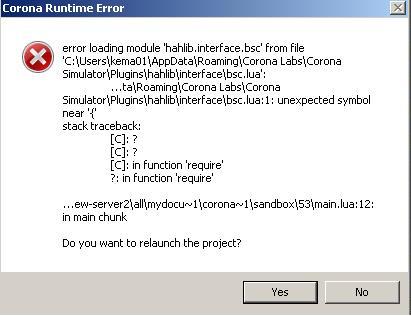
Every time I compile on my computer’s I get the following/similar error.
Windows simulator build date: Aug 28 2013 @ 17:45:55
Copyright (C) 2009-2013 C o r o n a L a b s I n c .
Member for
16 years 10 monthsKema,Its been a while since
Kema,
Its been a while since I've played with this.
Each "project" that is check out of the GIT repository needs to use the hahlib library files.
You need to copy "hahlib" into "C:\Program Files (x86)\Corona Labs\Corona SDK\Resources" so its available to ALL of those sub-projects - I tested this with the latest download 2015.2646 and it seems to do the trick.
Brett
Member for
13 years 4 monthsProgress
Brett many thanks for your quick response.
I have down loaded and installed the latest version (3.0.0 Build: 2015.2646) of Corona SDK and placed the hahlib folder in the resources directory.
Have had a very quick play and pleased to report I am getting further than I was.
Unfortunately will not be able to test further until next week.
Many thanks kema...
Member for
13 years 4 monthsMore Progress but
Brett I can confirm that I am making further progress. App’s now compiles OK with Corona.
I have tried the slider 2 widget, the slider is displayed on my lap top screen, when I move the slider I can see messages in the corona simulator output (bsc.sendText(dbzoo.livebox.kema:heating.Thermostat, 22)ect ect, but they do not appear in xfx message viewer.
Is there anything else I need to set up for this to be received by the HAH.
Many thanks
Kema…
Member for
16 years 10 monthsYup because the code that
Yup because the code that puts the xAP message on the wire by default is commented out. doh!
https://github.com/dbzoo/hah/blob/master/userapps/HAHCorona/sliderContr…
I must have been testing and forgot switch the comment around on those two lines.
Member for
13 years 4 monthsStill no joy.
Brett I have removed the commenting out but still no joy, I had seen this and wondered why it was there. Can you please let me know if it works for you, if it does I will investigate further.
many thanks
kema...
Member for
16 years 10 monthsWorks just fine for me once I uncommented that line.
Works just fine for me once I uncommented that line.
Member for
13 years 4 monthsUpdate
Brett many thanks for persevering with me. I did not explain my problem very well.
I can now see the following being received at dbzoo.corona.app (xfx message viewer) when the slider is moved.
xap-header
{
uid=FF123400
source=dbzoo.corona.app
hop=1
class=xAPBSC.cmd
target=dbzoo.livebox.kema:Heating.thermostat
v=12
}
output.state.1
{
id=*
text=16
}
but this is not being seen at dbzoo.livebox.kema:Heating.thermosat. Value of 17.2 was previously set before slider was moved :-
xap-header
{
v=12
hop=1
uid=FF00D802
class=xAPBSC.info
source=dbzoo.livebox.kema:Heating.thermostat
}
output.state
{
state=on
text=17.2
}
I was expecting an event to be generated to the text value of 16, which would update my thermostat setting.
Hope this makes sense.
Many thanks
kema
Member for
15 years 7 monthsKema,as you are getting a xap
Kema,
as you are getting a xap message directed at you end point it would suggest an issue with your endpoint handler.
Can you post your script that handles the thermostat?
Member for
13 years 4 monthsGarry Heating applet attached
Hi Garry the applet I am using is the one you helped me with many moons ago. I have modified it to fit my requirement’s. Temperature, thermostat and status are held in a cfg file.
Please see attached.
Many thanks for your and Bretts help.
kema...
Member for
13 years 4 monthsRead twice before commenting
Garry apologise in my haste I did not read and digest your post before I commented. Hopefully the applet below is not too far off the mark. The lines I have added are highlighted in italics below. I have borrowed this from another post on the forum as I am not sure of the exact syntax required to receive and pass on the incoming temperature text value. Please excuse my lack of lua expertise, I do not normally raise a post until I have thoroughly researched the forum exhausted my limited knowledge.
module(...,package.seeall)
require("xap")
require("xap.bsc")
require("string")
rex = require("rex_posix")
info={
version="KM.3", description="Alias FishFood All"
}
pat={
[rex.new("(relay) ([1-4]) (on|off)")]=function(m) rfRelayCmd(m) end,
[rex.new("(rf) ([0-9]+) (on|off)")]=function(m) rfRelayCmd(m) end,
["fishfeed"] = function() fishfeed() end,
["allOFF"] = function() allOFFcmd() end,
[rex.new("tweet (.*)")]=function(m) tweet(m) end,
[rex.new("temperature (.*)")]=function(m) temperature(m) end,
["reboot"] = function() os.execute("reboot") end}
function allOFFcmd()
bsc.sendState("dbzoo.livebox.Controller:rf.*", "off")
end
function tweet(m)
local msg = unpack(m)
bsc.sendText("dbzoo.livebox.Twitter",msg)
end
function rfRelayCmd(t)
local addr1,addr2,state = unpack(t)
bsc.sendState(string.format("dbzoo.livebox.Controller:%s.%s",addr1,addr2),state)
end
function temperature(msg)
sendBscCmd("dbzoo.livebox.kema:Heating.thermostat","state="..msg)
end
function fishfeed()
bsc.sendState("bscmsg -t dbzoo.livebox.jeenode:kema7.relay1 -s on")
FfeedOffTime = os.time() + 40 -- 30 seconds
xap.Timer(CountLoop, 10):start(true) --start timer fire immediately
end
function CountLoop(timer)
RunningTime = os.difftime(FfeedOffTime,os.time()) -- in seconds
if RunningTime <= 0 then
bsc.sendState("bscmsg -t dbzoo.livebox.jeenode:kema7.relay1 -s off")
RunningTime = 0
timer:delete()
end
end
function aliasEngine(frame)
local alias = frame:getValue("command","text")
for r,f in pairs(pat) do
if type(r) == "string" then
if r == alias then
f()
end
else
p={r:match(alias)}
if #p > 0 then
f(p)
end
end
end
end
function init()
local f = xap.Filter()
f:add("xap-header","class","alias")
f:add("command","text",xap.FILTER_ANY)
f:callback(aliasEngine)
end
Many Thanks
Kema…
Member for
15 years 7 monthsShould it not be:function
Should it not be:
function temperature(m)
local msg = unpack(m)
bsc.sendText("dbzoo.livebox.kema:Heating.thermostat",msg)
end
also, this looks wrong to me:
bsc.sendState("bscmsg -t dbzoo.livebox.jeenode:kema7.relay1 -s on")
os.execute("bscmsg -t dbzoo.livebox.jeenode:kema7.relay1 -s on")
to send command via shell using Brett's bscmsg program or:
bsc.sendState("dbzoo.livebox.jeenode:kema7.relay1","on")
to send via lua.
Garry
Member for
13 years 4 monthsUpdate
Garry I have had two major computer problems this week, CPU failure on our house server due to fan failure and to compound this, I was infected by a nasty virus while installing Flash software on a replacement machine. Luckily I have backups of most files.
Please bear with me as I will not be able to test your recommendations until next week.
Many thanks for your help and support.
kema...
Member for
16 years 10 monthsKema, I had to clean up a
Kema, I had to clean up a friends computer from nasties a few days ago I found this useful "windows defender offline"
http://windows.microsoft.com/en-AU/windows/what-is-windows-defender-off…
Member for
13 years 4 monthsStill Struggling
Brett many thanks for the link.
Garry I have followed your instructions in your post but still cannot get it working. When the slider is moved I can see the following message in XFX corona/demo.
xap-header
{
uid=FF123400
source=dbzoo.corona.app
hop=1
class=xAPBSC.cmd
target=dbzoo.livebox.Plugboard:Thermostat
v=12
}
output.state.1
{
id=*
text=15
}
If I send the following "bscmsg -t dbzoo.livebox.kema:Heating.thermostat -s on -x 19.5" from the command prompt I get the following message in xfx viewer
xap-header
{
uid=FF00DF00
source=dbzoo.livebox.bscmsg
hop=1
class=xAPBSC.cmd
target=dbzoo.livebox.kema:Heating.thermostat
v=12
}
output.state.1
{
state=on
text=00.1
id=*
}
This has an extra line "state=on" which I do not get from the slider xfx viewer.
Have no idea if I am going in the correct direction with this comparison.
Many thanks
Kema…
Member for
16 years 10 monthsThe state should be there
The state should be there that's a bug in the slider code.
bscSend{target=opt.xapTarget, text=temperature}
should be:
bscSend{target=opt.xapTarget, text=temperature, state="on"}
Member for
15 years 7 monthsAlso,in the example above,
Also,
in the example above, your target is different:
target=dbzoo.livebox.Plugboard:Thermostat
from corona and
target=dbzoo.livebox.kema:Heating.thermostat
from your bscmsg example.
Also, so, is this really correct? You send this from command line: bscmsg -t dbzoo.livebox.kema:Heating.thermostat -s on -x 19.5
but see this in xfx:
output.state.1
{
state=on
text=00.1
id=*
}
Very odd if you do?!
Garry
Member for
13 years 4 monthsSuccess, but new can of worms !!!
Brett, success adding state "on" has fixed the problem. But I now have a new issue. Please see below.
Garry you are correct on both counts in my example. It should have been “target=dbzoo.livebox.kema:Heating.thermostat” and “19.5”. I had too many xfx windows open at the same time and could not see the wood from the trees, will be more careful in future.
NEW PROBLEM
When the slider is moved I get the following error, I have always had the Helvetica Font issue, this does not seem to cause any issues.
Windows simulator build date: May 27 2015 @ 18:15:50
Copyright (C) 2009-2015 C o r o n a L a b s I n c .
Version: 3.0.0
Build: 2015.2646
Platform: GT-I9300 / x86 / 6.1 / Intel(R) G41 Express Chipset / 2.1.0 - Build 8.15.10.2302 / 2015.2646
Loading project from: c:\users\kema01\docume~1\corona~2\sandbox\52
Project sandbox folder: C:\Users\kema01\AppData\Roaming\Corona Labs\Corona Simulator\Sandbox\52-4E6AF0065E7446185B50372E9EF0A056\Documents
Warning: could not load font HelveticaNeue. Using default font.
Warning: could not load font HelveticaNeue. Using default font.
Warning: could not load font HelveticaNeue. Using default font.
Warning: could not load font HelveticaNeue. Using default font.
Warning: could not load font HelveticaNeue. Using default font.
bsc.sendText(dbzoo.livebox.kema:Heating.thermostat, 6)
Runtime error
C:\PROGRA~1\CORONA~1\CORONA~1\Resources\hahlib\xap\init.lua:466: c:\users\kema01\docume~1\corona~2\sandbox\52\scene4.lua:68: attempt to perform arithmetic on local 'temp' (a nil value)
xAP Message being processed.
xap-header
{
uid=FF00D802
source=dbzoo.livebox.kema:heating.thermostat
hop=1
class=xapbsc.event
v=12
}
output.state
{
state=on
text=6
}
stack traceback:
[C]: in function 'error'
C:\PROGRA~1\CORONA~1\CORONA~1\Resources\hahlib\xap\init.lua:466: in function 'dispatch'
C:\PROGRA~1\CORONA~1\CORONA~1\Resources\hahlib\xap\init.lua:73: in function 'processFrame'
C:\PROGRA~1\CORONA~1\CORONA~1\Resources\hahlib\xap\init.lua:81: in function '_listener'
?: in function <?:141>
?: in function <?:221>
Many thanks to you both for you perseverance in helping me resolve this.
kema...
Member for
16 years 10 monthsSeveral things are wrong here
What is sending this xAP event? Is that something from the someother piece of code ?
Its not formed correctly and the slider is not handling it (another bug there too).
This is wrong....
output.state
{
state=on
text=6
}
There are several things wrong with the body.
1. output.state should be output.state.1
2. Its missing an id=* attribute
output.state.1
{
id=*
state=on
text=6
}
3. To fix the slider crash you should return if TEMP is nil
local temp = frame:getValue("output.state.1","text")
+ if temp == nil then
+ return
+ end
local sliderlevel = ((temp-opt.states[1]) / #opt.states) * 100
See how its looking for output.state.1 but it does not find it so it gets "nil" consequently that causes a problem.
Brett
Member for
16 years 10 monthsWAIT My BAD this is an
WAIT My BAD this is an xapBSC.event not a xAPBSC.cmd - so output.state is correct.
You just need to add that little bit of code then.
ARRGH double bad.... just remove the .1 this call is for an xAPBSC.event - its a coding bug.
local f = xap.Filter()
f:add("xap-header","source",opt.xapTarget)
f:add("xap-header","class","xAPBSC.event")
f:callback(function(frame)
local temp = frame:getValue("output.state","text")
Brett
Member for
13 years 4 monthsSlightly confused
Brett
I am slightly confused by your last post regarding removing “.1”.
If I leave in “.1” all seems to work OK.
If I remove “.1” then I get a similar error as before.
Below is the code that seems to work
local f = xap.Filter()
f:add("xap-header","source",opt.xapTarget)
f:add("xap-header","class","xAPBSC.event")
f:callback(function(frame)
local temp = frame:getValue("output.state.1","text")
if temp == nil then
return
end
Many Thanks kema
Member for
16 years 10 monthsLets consult ye specification
Lets consult ye specification on BSC shall we.
http://www.xapautomation.org/index.php?title=Basic_Status_and_Control_S…
Events should be "ouput.state" or "input.state" removing the .1 is correct.
If its breaking then that is different problem that needs addressing.
You need to post the xap packet that is breaking it.
Brett
Member for
13 years 4 monthsNew Error
Brett here is the error I am seeing in the corona simulator output.
Windows simulator build date: May 27 2015 @ 18:15:50
Copyright (C) 2009-2015 C o r o n a L a b s I n c .
Version: 3.0.0
Build: 2015.2646
Platform: GT-I9300 / x86 / 6.1 / Intel(R) G41 Express Chipset / 2.1.0 - Build 8.15.10.2302 / 2015.2646
Loading project from: c:\users\kema01\docume~1\corona~2\sandbox\52
Project sandbox folder: C:\Users\kema01\AppData\Roaming\Corona Labs\Corona Simulator\Sandbox\52-4E6AF0065E7446185B50372E9EF0A056\Documents
Warning: could not load font HelveticaNeue. Using default font.
Warning: could not load font HelveticaNeue. Using default font.
Warning: could not load font HelveticaNeue. Using default font.
Warning: could not load font HelveticaNeue. Using default font.
Warning: could not load font HelveticaNeue. Using default font.
bsc.sendText(dbzoo.livebox.kema:Heating.thermostat, 7)
Runtime error
C:\PROGRA~1\CORONA~1\CORONA~1\Resources\hahlib\xap\init.lua:466: c:\users\kema01\docume~1\corona~2\sandbox\52\scene4.lua:74: attempt to compare nil with number
xAP Message being processed.
xap-header
{
uid=FF00D802
source=dbzoo.livebox.kema:heating.thermostat
hop=1
class=xapbsc.event
v=12
}
output.state
{
state=on
text=7
}
stack traceback:
[C]: in function 'error'
C:\PROGRA~1\CORONA~1\CORONA~1\Resources\hahlib\xap\init.lua:466: in function 'dispatch'
C:\PROGRA~1\CORONA~1\CORONA~1\Resources\hahlib\xap\init.lua:73: in function 'processFrame'
C:\PROGRA~1\CORONA~1\CORONA~1\Resources\hahlib\xap\init.lua:81: in function '_listener'
?: in function <?:141>
?: in function <?:221>
Many thanks kema
Member for
15 years 7 monthsKema,can you please post your
Kema,
can you please post your scene4.lua file and the exact error message you are getting.
also cooy the related xfx xap messages that you see, both cmd and events.
garry
Member for
13 years 4 monthsAs requested
Garry
I am using the slider 2 app, which I have adapted to be used in the multi scene program. Please find attached to this post.
This is the XFX message seen at corona.
xap-header
{
uid=FF123400
source=dbzoo.corona.demo
hop=1
class=xAPBSC.cmd
target=dbzoo.livebox.kema:Heating.thermostat
v=12
}
output.state.1
{
id=*
text=6
state=on
}
This is the message seen at xfx kema:Heating.thermostat
xap-header
{
v=12
hop=1
uid=FF00D802
class=xAPBSC.event
source=dbzoo.livebox.kema:Heating.thermostat
}
output.state
{
state=on
text=6
}
I am not quite sure what you mean by the exact error message, as I have already posted the run time error message in the corona simulator. Do I need to capture some sort of debug message.
As you are aware my coding experience is at the embryotic stage.
If you require any further information please let me know.
Many thanks
kema...
Member for
16 years 10 monthsKema,73
Kema,
73 local sliderlevel = ((temp-opt.states[1]) / #opt.states) * 100
74 if sliderLevel < 0 then
75 sliderLevel = 0
76 end
You are getting an error on line 74 as line 73 has defined a different variable.
Variables in LUA are case senstive. Look at these lines carefully.
Brett
Member for
15 years 7 monthsAs Brett says, your earlier
As Brett says, your earlier error message was pointing you to the issue.
C:\PROGRA~1\CORONA~1\CORONA~1\Resources\hahlib\xap\init.lua:466: c:\users\kema01\docume~1\corona~2\sandbox\52\scene4.lua:74: attempt to compare nil with number
Member for
13 years 4 monthsThank you
Brett and Garry
I have no idea how this happend, as I just cut and paste from the slider 2 main into the scene 4. I could see there was a problem with line 74 but not the problem itself.
This is exactly my issue I lack confidence and knowledge, but am learning all the time.
If you dont mind giving me a little more assistance please with scene 4, I would be very grateful. I have an issue when I move to a new scene after previously selecting scene 4, where by the slider is super imposed under/over the newly selected scene.
Also is it possible to step in .1 of a degree instead of 1 degree.
Many Thanks
kema,,,
Member for
16 years 10 monthsThe scene problem is due to
The scene problem is due to the fact you have not added the slider into the scene's view.
myslider = newHorizSliderWithFeedback { etc ..}group.add(myslider)
You already had
Member for
13 years 4 monthsWill research further
Brett
Thanks for the pointers, will look into this further.
kema...